
Tokens & cost
See what your Claude Code sessions cost, how much prompt caching saves, and how full each context is. Then act on tips for spending less.
Press ⌘⇧G (or Tokens: Usage, cost and ways to save in the command palette).
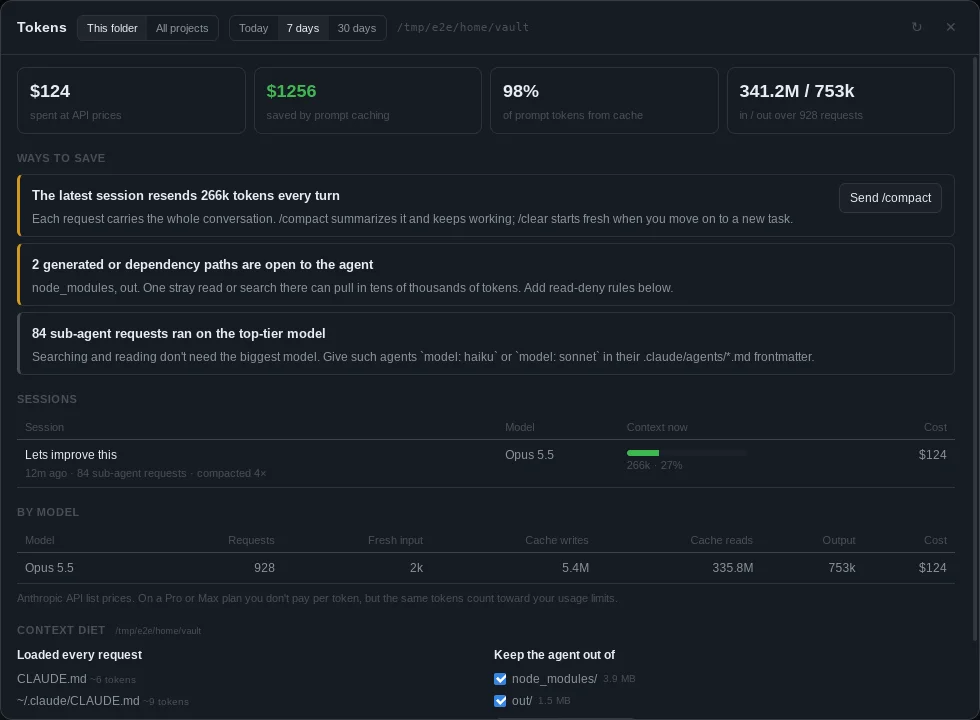
Where the numbers come from
Claude Code records the exact token usage of every API response in its session transcripts under ~/.claude/projects/. ADE reads those files, including sub-agents, locally. Nothing is sent anywhere.
- This folder shows the sessions started in the active terminal’s folder. All projects shows every project.
- Choose Today, 7 days or 30 days.
- Costs use Anthropic’s API list prices for each model, counting fresh input, 5-minute and 1-hour cache writes, cache reads and output at their own rates. On a Pro or Max plan you don’t pay per token, but the same tokens count toward your usage limits.
- A model ADE has no published price for (a router, or a local model) is left out of the cost rather than guessed at, and named underneath the figures so you know it is partial. Its tokens and requests are still counted.
At the top of the panel:
| Figure | What it means |
|---|---|
| Spent | Cost at API prices for the period |
| Saved by prompt caching | What the same requests would have cost with no cache, minus what they cost |
| From cache | Share of prompt tokens served from cache, which cost a tenth of fresh input or less |
| In / out | Prompt and output tokens, and the number of requests |
Sessions and context
Each session shows its first prompt, model and cost. It also has a context meter: the size of its latest request against the model’s context window. That’s how much the next turn resends. The meter turns amber at half full and red at three quarters.
Ways to save
The panel suggests savings based on your own usage:
- A large context. Send
/compactto the agent in the active terminal with one click./compactsummarizes the conversation so far;/clearstarts fresh for a new task. - A low cache hit rate. Long pauses let the cache expire, and changing
CLAUDE.md, the model or MCP servers mid-session invalidates it. - Sub-agents on the top-tier model. Set Sub-agent model to Sonnet (see below). For agents that only search and read,
model: haikuin their.claude/agents/*.mdfrontmatter saves more. - Long responses. Output costs about five times as much as input, so ask for targeted edits instead of whole files.
- Large
CLAUDE.mdfiles and many MCP servers. Both are part of every request.
Context diet
For the active terminal’s folder, the panel lists:
- What loads into every request:
CLAUDE.md,CLAUDE.local.md,.claude/CLAUDE.mdand your user-level~/.claude/CLAUDE.md, with rough token counts, plus the MCP servers in.mcp.json. - Generated and dependency paths an agent could wander into:
node_modules,dist,build,out,target,.next,coverage,vendor, virtualenvs, and large lockfiles.
Tick the paths to exclude and click Add read-deny rules. ADE adds rules such as Read(./node_modules/**) to permissions.deny in .claude/settings.json and keeps everything else in the file. Claude Code’s file tools then skip those paths, so a stray search can’t pull in thousands of tokens. New sessions pick the rules up. Paths that are already denied are marked.
Context guard
ADE watches the newest Claude Code session in the active terminal’s folder. Once its context passes a threshold, you get a notification. The default threshold is 60% of the model’s window. Type /compact puts the command on the terminal’s prompt for you to check and send with Enter. The guard fires once per session and fires again only after the context has dropped back below the threshold. Change the threshold (40–80%) or turn the guard off in the Tokens panel.
ADE never presses Enter for you. It can’t tell which terminal a session runs in, or whether Claude is waiting on a permission prompt, where an Enter would approve it. To compact automatically, use Claude Code’s own Auto-compact at setting below.
Claude Code settings
The panel can set a few documented Claude Code settings for you in the project’s .claude/settings.local.json. Claude Code keeps that file out of git, so your choices don’t change your teammates’ models. Each one is a separate choice, and Not set removes the setting again:
| Setting | Choices | What it does |
|---|---|---|
Bash output sent to the model (BASH_MAX_OUTPUT_LENGTH) |
15,000 or 8,000 characters (default 30,000) | Cuts long command output before the agent reads it |
Sub-agent model (CLAUDE_CODE_SUBAGENT_MODEL) |
Sonnet (recommended) or Haiku | Model for sub-agents that don’t name one. Sonnet keeps the 1M context at a lower price; Haiku has a 200k window and is best kept to searching and reading |
Auto-compact at (CLAUDE_CODE_AUTOCOMPACT_PCT_OVERRIDE) |
80%, 70% or 60% | How full the context gets before Claude Code compacts it |
Default model (model) |
opusplan or Sonnet |
opusplan plans with Opus, then writes code with Sonnet |
ADE only writes these keys, with these values, and keeps everything else in the file. If ADE creates the file, it adds it to the repository’s local ignore list (.git/info/exclude), just as Claude Code does. To share a setting with your team, copy it into .claude/settings.json.
In the scratchpad
- The footer shows a rough token count for what you’re about to send. It turns amber above 4,000 tokens and red above 20,000.
- When you paste a long or noisy log, ADE offers to compact the paste. It strips colors, keeps only the final state of progress bars, merges repeated lines, and trims a very long middle down to its errors and warnings. You see the token count before and after, and nothing changes unless you click.