
Agents & fleet
Launch agents from profiles, watch every agent and sub-agent on one timeline, and plan work with the orchestrator.
Every project ADE opens is also set up with BMAD, the ADE methodology and Claude Code sub-agents for its roles and stack. See Project setup.
Agent picker
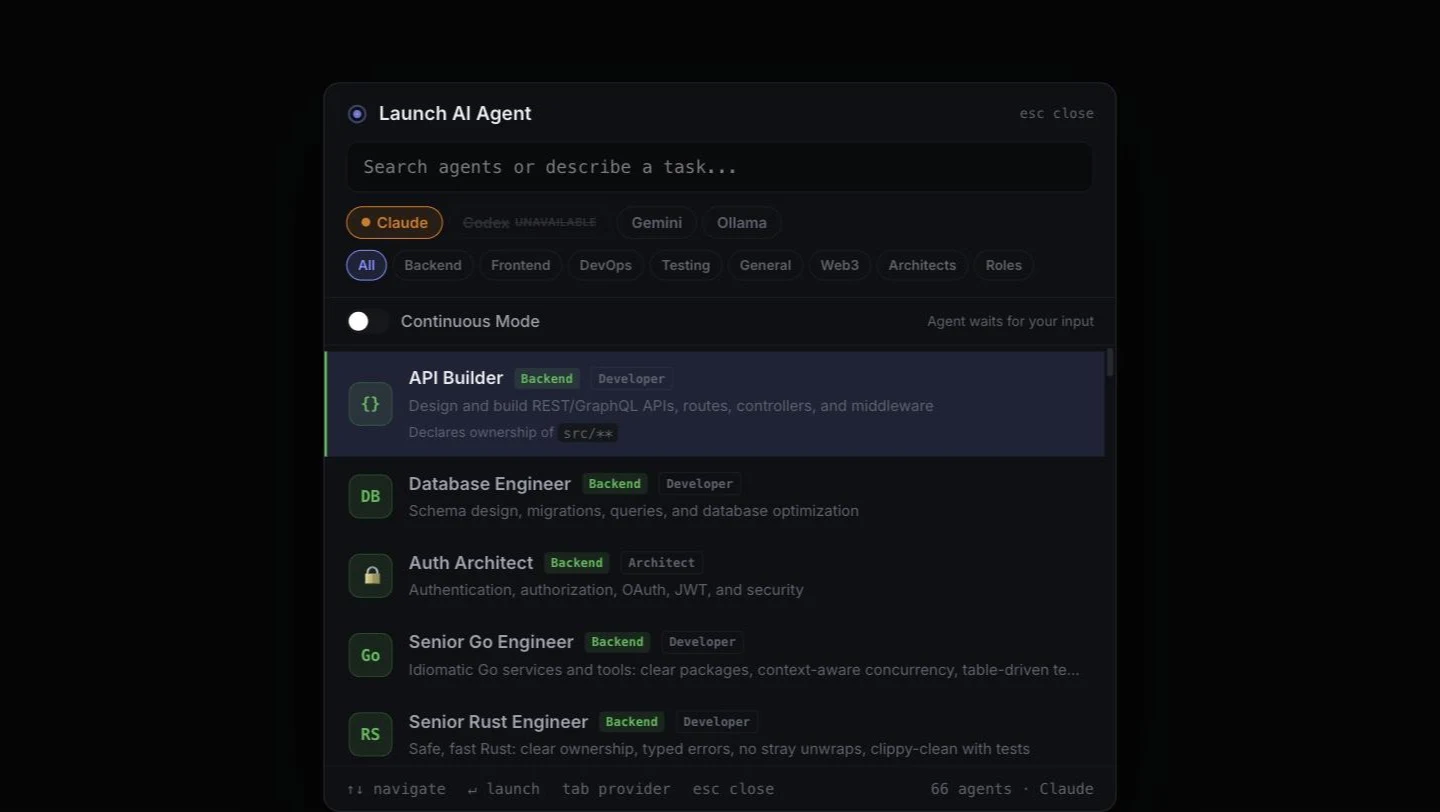
Press ⌘⇧A to pick an agent. When you choose one, ADE asks where to run it: this terminal (C) or a new tab in the same folder (N). If the current terminal is already running something, New tab is preselected.
- 47 profiles across Backend, Frontend, DevOps, Testing, Web3, Architects and General: API Builder, Database Engineer, Senior Go Engineer, Senior Rust Engineer, Smart Contract Auditor, Web3 DevOps Engineer, Debugger, Code Reviewer, Docs Writer and more. Each pairs a role: what it is accountable for, the files it owns and the boundaries it works inside, with a domain that narrows it to one technical focus. ADE composes the pair into a role definition, writes it to a file and starts the provider against that file, so a long definition never has to survive shell quoting. See Smart contracts for the Web3 engineers and Architects below.
- Roles: the last pill filters the list down to the core roles on their own, with no domain. Product Manager, Product Owner and Scrum Master live only here, since no profile pairs with them.
- Describe a task in the search box and the picker suggests the best match.
- Provider: switch between Claude Code, Codex, Gemini CLI and Ollama with Tab. Claude Code, Gemini and Ollama each accept a composed role; Codex is shown unavailable, because it has no verified way to take one and a guessed flag would fail silently at launch.
- Senior Go Engineer writes idiomatic Go with table-driven tests and runs
go vetandgo test -race. Senior Rust Engineer models the domain with types, avoids strayunwraps and runscargo fmt,cargo clippyandcargo test. Both are also added to Go and Rust projects as sub-agents. - Continuous mode runs the agent without permission prompts (Claude Code’s
--dangerously-skip-permissions). ADE asks you to confirm first; use it only in projects you trust.
Architects
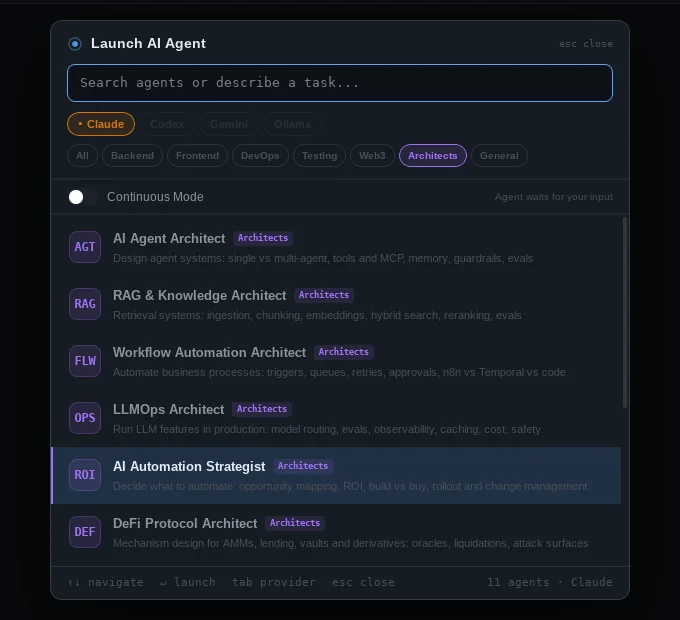
The Architects category holds brainstorming partners for AI automation and Web3 design. They don’t write code unless you ask. Each one:
- asks up to five sharp questions about your goals, constraints, scale, budget and risk tolerance;
- proposes two or three genuinely different approaches and compares them in a table (complexity, cost, risk, time to ship, what breaks first);
- recommends one, draws it as a Mermaid diagram, and challenges your assumptions;
- records each agreed decision as an ADR in
docs/adr/NNNN-short-title.md. Click the path it prints to read the decision, diagram included, in the preview panel.
| Architect | Brainstorm about |
|---|---|
| AI Agent Architect | Whether you need an agent at all, single vs multi-agent, orchestration patterns, tools and MCP servers, memory, human-in-the-loop, guardrails, evals, cost and latency |
| RAG & Knowledge Architect | Ingestion, chunking, embeddings, hybrid search and reranking, permissions, freshness, measuring retrieval and answer quality |
| Workflow Automation Architect | Mapping the process, rules vs AI, n8n/Zapier vs Temporal vs your own queues, idempotency and retries, approvals, observability |
| LLMOps Architect | Model selection and routing, prompt versioning, evals, tracing, caching, fallbacks, cost budgets, PII and safety |
| AI Automation Strategist | Which processes to automate first, ROI and payback, build vs buy, pilots with success metrics, rollout and change management |
| DeFi Protocol Architect | Mechanism invariants, oracles, liquidations and bad debt, risk parameters, flash-loan and MEV attack surfaces, governance |
| Tokenomics Designer | Whether you need a token, utility and value accrual, supply, emissions and vesting, staking, governance capture, airdrop sybils |
| Smart Contract Systems Architect | Splitting contracts into modules, upgradeability (immutable, UUPS, transparent, diamond), roles, pausing, storage layout, audit readiness |
| Web3 Infrastructure Architect | Indexers and subgraphs, RPC redundancy and reorgs, account abstraction, key management, relayers and off-chain workers |
| Cross-chain & L2 Architect | Choosing chains and rollups, bridges and messaging protocols and their trust assumptions, finality, liquidity fragmentation |
| AI x Web3 Architect | Agents that hold wallets: smart accounts, session keys and spend limits, intents, agent payments, prompt-injection risk to funds, kill switches |
Describe the problem in the picker’s search box (“tokenomics for a governance token with vesting”, “RAG over our support docs”) and the matching architect is suggested.
Fleet view
Claude Code agents spawn sub-agents (Explore, Plan, code reviewers) that normally run out of sight. ADE reads Claude Code’s transcripts and shows each one as it starts and finishes.
- ⌘. opens the fleet panel for the active terminal. Switch to All terminals to see every terminal at once, each with its folder, running count and cost; Go to tab jumps there.
- Fleet: All terminals in the command palette opens the same view as a full tab.
- The timeline shows swimlanes. In the fleet tab you choose the last 5 minutes, 15 minutes, hour or all time; the panel always shows the last 15 minutes. Click an agent to jump to its pane.
- Seeing nothing? Agents are filed under the folder Claude Code was started in, so a terminal sitting somewhere else has none of its own, the empty timeline names the folder it is watching. Older runs need the tab’s all range; anything past 15 minutes is outside the panel’s window.
- Cost is real: Claude agents’ token usage comes from Claude Code’s transcripts and is priced at API list prices (see Tokens & cost). If two agents run in the same folder at the same time, their usage can’t be told apart and is left out. Codex, Gemini and Ollama sessions show no cost.

Orchestrator
Press ⌘⇧O to open an Orchestrator tab and talk through a project (type in the scratchpad). It breaks the work into tasks, each with an agent profile, a priority and its dependencies.
- Dispatch one task, or Dispatch All ready tasks. Each runs in its own terminal with
claude, the task, and a generatedSPEC.md. - The orchestrator uses the Anthropic API (add your key in Settings → AI API) or a local Ollama model.
BMAD
BMAD-METHOD is installed as part of project setup. The bundled, pinned copy goes into .bmad-core/ along with the /BMad:tasks: slash commands for Claude Code; nothing is downloaded and existing files are never overwritten. BMAD’s own ten personas are not installed: eight of them are the same jobs as the roles below, and a project carrying two architects and two QAs carries two definitions of Done.
The BMAD panel shows the method’s two phases, Planning and Dev cycle, as a reminder of where a project is.
The personas themselves are roles in the agent picker (filter to Roles and you have all nineteen) Analyst, Product Manager, Designer, Architect, Product Owner, Scrum Master, Developer, QA, DevOps, Adversarial Reviewer, Security Engineer, SRE, Release Manager, Engineering Manager, Support Engineer, Solutions Engineer, Brainstorming Architect, Technical Writer and Advisor, each with the accountability and owned files of its role. Launching one from there asks which provider to use and whether to run it in this terminal or a new tab, which the old persona buttons could not do. Product Owner and Scrum Master are reachable only this way, since no agent profile pairs with them.
Browser tab
Choose Open Browser Tab in the command palette to keep a local dev server (by default http://localhost:3000) open in ADE, next to the agent building it.