
Smart contracts
Build, test, analyze and deploy Solidity and Solana programs from one panel, with a local chain, readable ABIs and agents that know contract security.
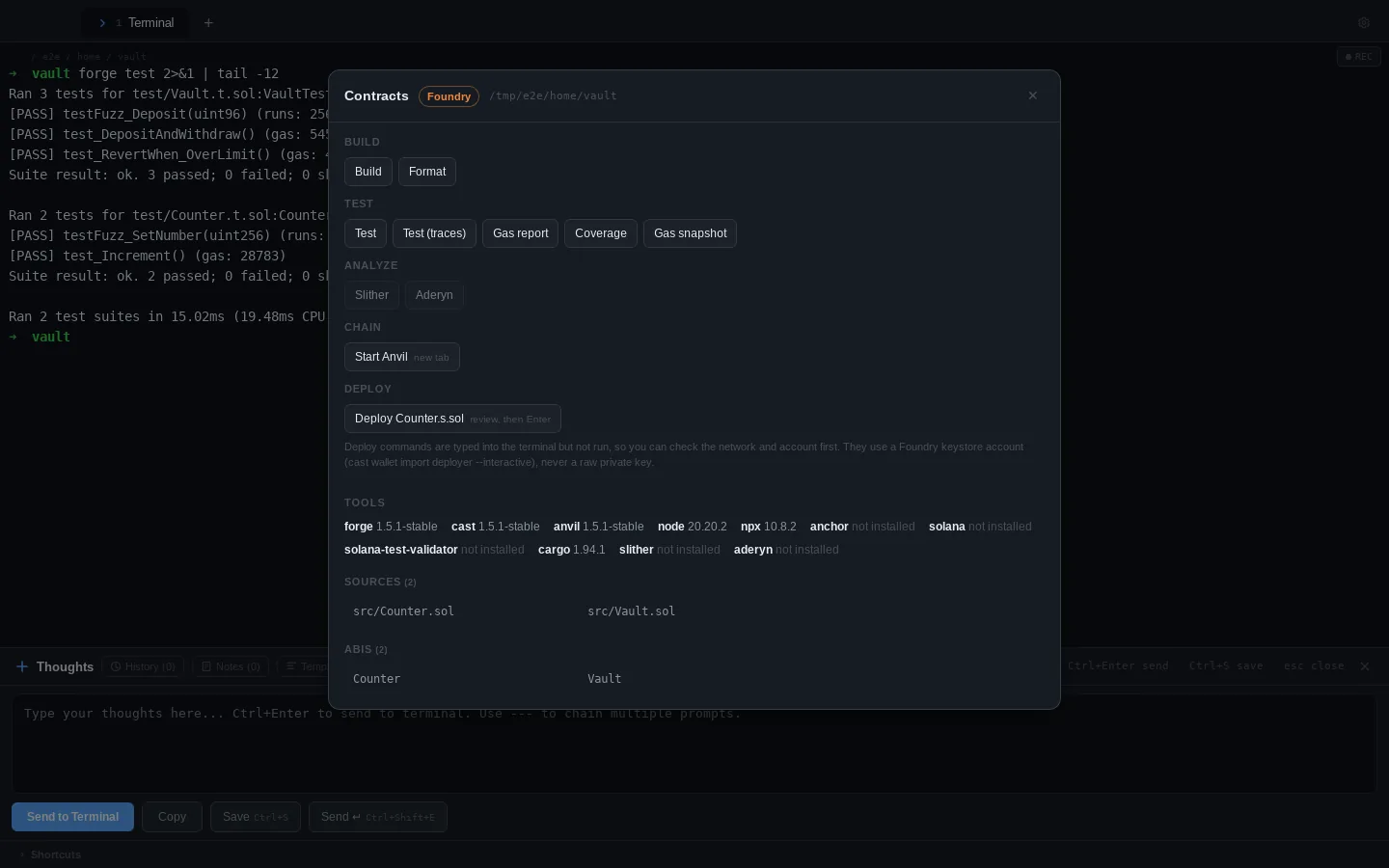
Press ⌘⇧K (or Contracts: Open panel in the command palette) in any terminal inside a contract project.
Supported toolchains
ADE finds the project from the terminal’s current folder, looking upwards for its config file, so it works from any subfolder.
| Toolchain | Detected by | Sources | ABIs |
|---|---|---|---|
| Foundry | foundry.toml |
src/ (or the src set in foundry.toml) |
out/ |
| Hardhat | hardhat.config.ts / .js |
contracts/ |
artifacts/ |
| Anchor (Solana) | Anchor.toml |
programs/*/src |
target/idl/ |
Dependencies (lib/, node_modules/), tests and scripts are left out of the lists, so you only see your own contracts.
Actions
| Group | Foundry | Hardhat | Anchor |
|---|---|---|---|
| Build | forge build, forge fmt |
npx hardhat compile |
anchor build, cargo fmt |
| Test | forge test (also -vvv), gas report, coverage, gas snapshot |
npx hardhat test, gas report, coverage |
anchor test |
| Analyze | Slither, Aderyn | Slither | none |
| Local chain | anvil |
npx hardhat node |
solana-test-validator |
| Deploy | each script/*.s.sol |
each Ignition module | anchor deploy to devnet |
- Build, test and analysis run in the active terminal, from the project root, wherever you’ve
cd‘d to. - The local chain starts in its own tab, so it keeps running while you work.
- Actions whose tool isn’t installed are greyed out; the Tools list shows what’s installed and which version.
The command palette has quick versions too: Contracts: Build, Contracts: Test, Contracts: Test with gas report, Contracts: Coverage, Contracts: Analyze with Slither and Contracts: Start local chain.
Workbench
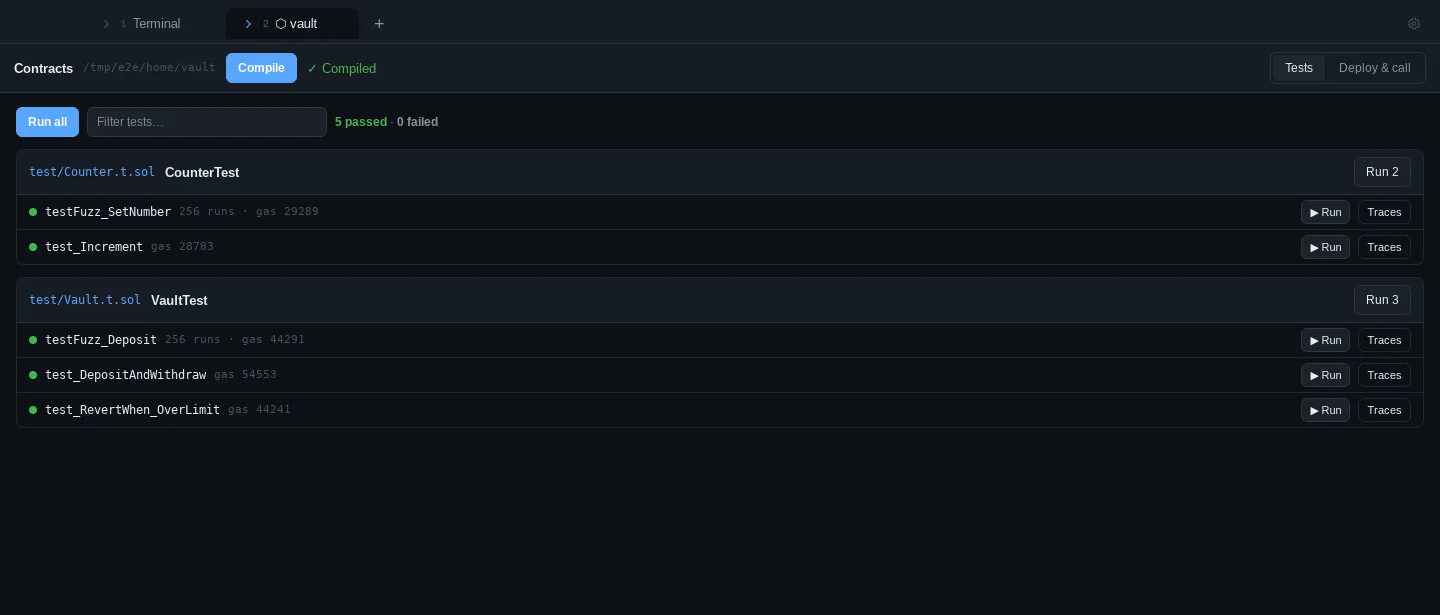
For Foundry projects, Open workbench in the panel (or Contracts: Open workbench in the command palette) opens a tab for the project where you can compile, run tests one at a time, and deploy to and call contracts on a local chain without typing commands.
Compile and test
- Compile runs
forge build. Errors and warnings are listed inline, and eachfile:line:colopens the file. - Every test function is listed under its test contract. ▶ Run runs just that test, Run N runs one contract’s tests, and Run all runs them all. Filter by name at the top.
- Each test shows pass or fail, its gas (the median for fuzz tests) and its fuzz runs. A failing test shows its reason, the counterexample and any
console.logoutput. - Traces reruns one test with
-vvvvin a new terminal tab.
Deploy and call on a local chain
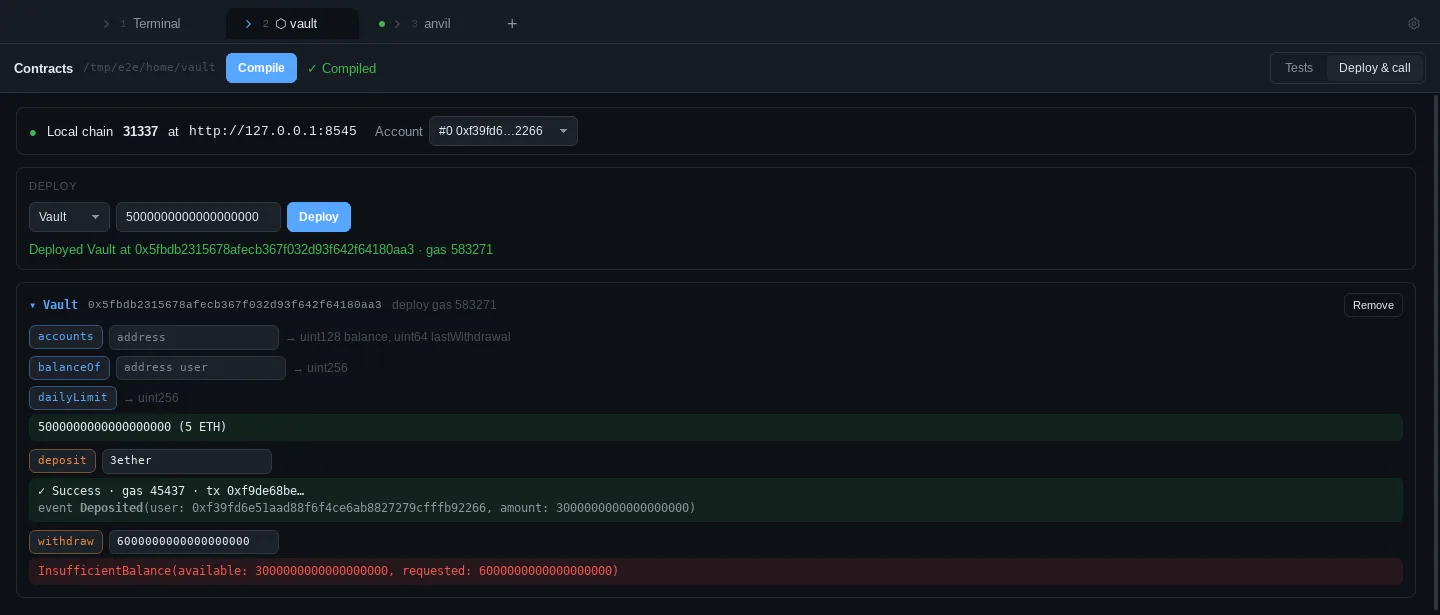
The Deploy & call view works against Anvil at http://127.0.0.1:8545. Start Anvil starts it in its own tab.
- Pick an Anvil account, a contract and its constructor arguments (plus a value if the constructor is
payable), then Deploy. - Each deployed contract lists its functions. Blue buttons are reads (
cast call) and orange ones are writes (cast send). - Values accept wei or units such as
3etherand2gwei. Large numbers get an ETH hint. - Writes show the transaction status, its gas and its events decoded against the ABI. Reverts are decoded too: custom errors are shown with their argument names, along with
Error(string)and panics such as arithmetic overflow.
The workbench keeps each project’s results and deployed contracts while you switch tabs.
Local chain only. The workbench sends transactions only to 127.0.0.1 or localhost, and only from Anvil’s unlocked accounts. It rejects private keys, mnemonics, keystores, hardware wallets and --broadcast, and it never runs forge or cast through a shell. Deploys to real networks go through Deploying safely.
Deploying safely
Deploy actions type the command into the terminal without running it, so you can check the network and account and then press Enter:
forge script script/Deploy.s.sol --rpc-url "$RPC_URL" --account deployer --broadcast
ADE never asks for, stores or syncs a private key. Foundry deploys use an encrypted keystore account, create one once with:
cast wallet import deployer --interactive
Set RPC_URL in your shell (or use a name from [rpc_endpoints] in foundry.toml). Hardhat deploys use --network from your Hardhat config, and Anchor uses your Solana CLI wallet.
ABI viewer
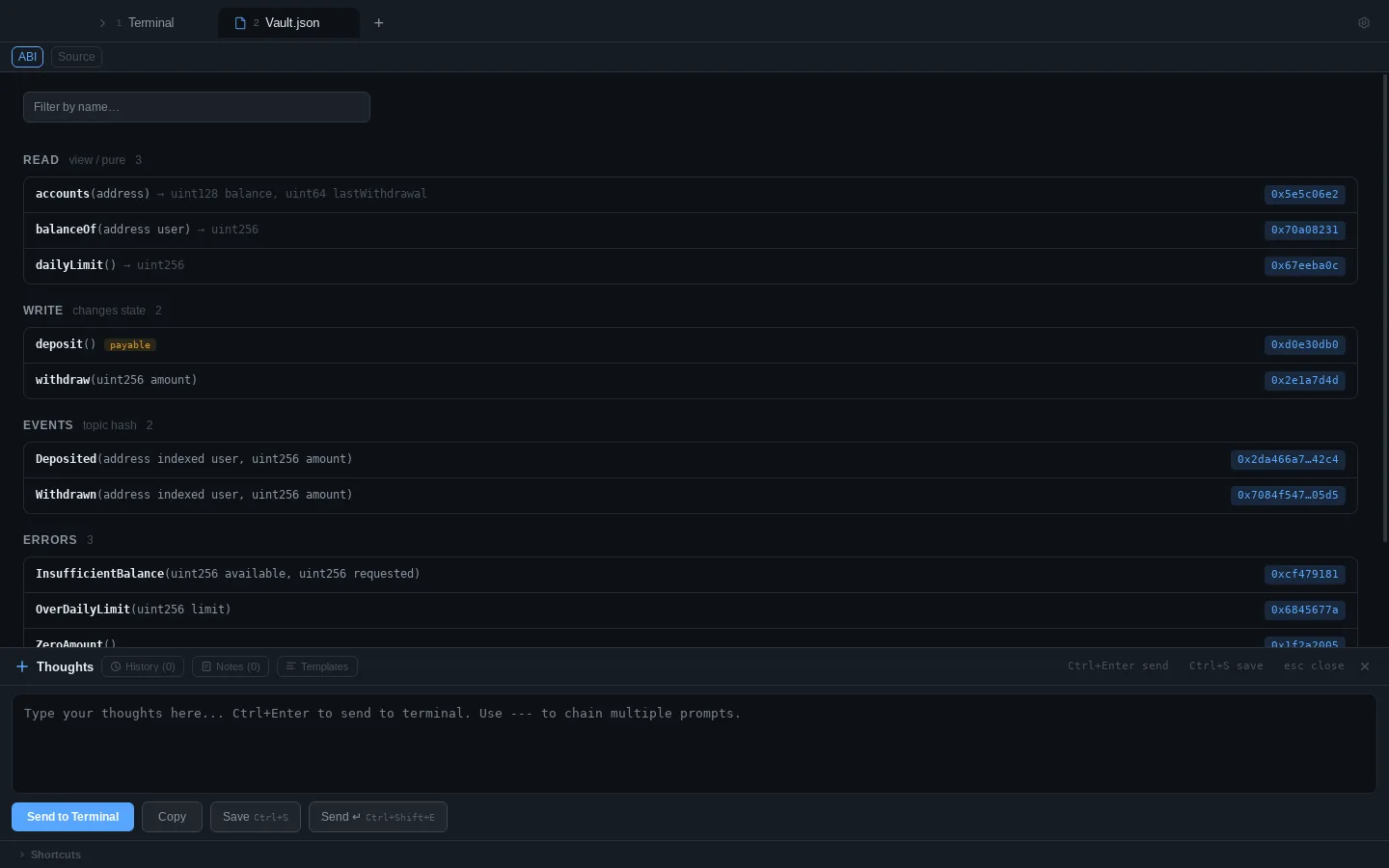
Open any compiled artifact (from the panel’s ABIs list, the file browser, or a path printed in the terminal) and it shows the contract’s interface instead of raw JSON:
- Read functions (view/pure) and Write functions, with inputs, outputs and
payable - Events with their indexed parameters and topic hash
- Errors with their selectors
- Click a selector to copy it; filter by name at the top
Selectors are computed with keccak-256 exactly as the EVM does, so you can match them against calldata or a revert. Source switches back to the JSON.
Anchor IDLs open the same way, listing each instruction with its arguments and accounts (marked mut and signer) and the program’s error codes.
Editing contracts
.sol files open with Solidity syntax highlighting. Compiler errors such as --> src/Vault.sol:42:5 are clickable in the terminal and open the file.
Web3 agents
The agent picker (⌘⇧A ) has a Web3 category:
| Agent | What it does |
|---|---|
| Smart Contract Engineer | Solidity with Foundry, test-first: unit, fuzz and invariant tests; runs forge build and forge test before reporting |
| Smart Contract Auditor | Reviews for reentrancy, access control, oracle manipulation, MEV, signature replay, upgrade risks and more; runs Slither or Aderyn; writes a Foundry proof-of-concept for each finding without changing your code |
| Gas Optimizer | Measures with forge snapshot and the gas report, applies one change at a time and reports before/after gas |
| Solana / Anchor Engineer | Anchor programs with careful account validation, PDAs and CPIs, plus TypeScript tests |
| Web3 DevOps Engineer | Contract CI, scripted local chains, RPC redundancy and monitoring, and reviewed deploy scripts that sign with a keystore account, hardware wallet or multisig |
Describing a task (“audit the vault for reentrancy”, “write an ERC-20 with fuzz tests”) suggests the right one.
You don’t have to start them by hand. When ADE opens a Foundry or Hardhat project, project setup adds the engineer, auditor, gas optimizer and Web3 DevOps engineer to .claude/agents/, so Claude Code can delegate to them; Anchor projects get the Solana/Anchor engineer, auditor, Web3 DevOps engineer and senior Rust engineer. The DeFi, tokenomics, contract systems, Web3 infrastructure, cross-chain and AI x Web3 architects are in the picker’s Architects category.
Installing the tools
curl -L https://foundry.paradigm.xyz | bash && foundryup   # Foundry: forge, cast, anvil
pipx install slither-analyzer                              # Slither (needs solc or Foundry)
cargo install aderyn                                       # Aderyn
For Solana, install the Solana CLI and Anchor. ADE looks for tools in ~/.foundry/bin, ~/.avm/bin, the Solana install folder and your shell’s PATH.